
2ndLine - Second Phone Number
TextNow, Inc.Communication
4.117.62K Reviews
- Version
- 26.20.0.8
- Installs
- 10.00M
- Age Rating
- Everyone
Screenshots
Our Review of 2ndLine - Second Phone Number
 Analysis by Appyee
A second number is useful only if it makes everyday communication easier, not if it creates another inbox to babysit. That is the trade-off I keep in mind with 2ndLine: it gives you a separate line on a phone you already own, which can be a practical boundary for work, selling, or short-term projects. I like the idea most when the goal is organization rather than replacing a primary mobile service.
A useful boundary, not a second device
Because the number lives in an app, the appeal is straightforward: you can share a different contact number without handing out your main one or carrying an extra handset. TextNow, Inc. makes this communication app available for free, with in-app purchases ranging from $2.49 to $49.99 per item. That makes it easy to try, though I would still check the purchase choices in the app before relying on a particular paid option.
The distinction between a second number and a second phone matters. You still use the same device, so both lines compete for your attention and depend on the phone being available. For me, the benefit is the separation in how I give out my contact details; it is not the same thing as having another device with independent availability.
Where a second line earns its keep
I can see this working well for a person arranging a furniture pickup, advertising a used item, or coordinating a short-term project. You can use the second number for the conversation, then stop sharing it once the task is over. That is a more controlled approach than posting your everyday number in a public listing, although it is still wise to be selective about the details you share in messages.
It can also help when a freelancer wants clients to call a dedicated number while keeping personal conversations elsewhere. The useful habit is to treat the two lines as separate channels: give the app number to clients, check its messages at planned times, and keep personal contacts on the primary line. That routine creates a clearer boundary than simply installing the app and hoping the inboxes stay distinct on their own.
What to consider before depending on it
A separate number does not automatically make communication private or confidential. It can shield your primary number from the people you contact through the second line, but it does not make a conversation anonymous, and it is not a substitute for careful judgment about what you send. I would avoid using it as the sole channel for sensitive or time-critical communication unless I had tested the setup and knew I could reliably receive calls and messages.
It is also worth remembering that app-based calling and texting are different from having a second SIM plan. If you need a line that behaves independently of an app, or you want a number tied to a carrier arrangement, a second SIM or a separate low-cost phone plan may fit better. If your priority is simply separating contact details on one smartphone, though, an app can be a lighter option to manage.
Who will appreciate the arrangement
I would point casual sellers, side-hustle operators, and people who want a public-facing contact number toward this kind of setup. It is especially appealing if you prefer one handset and want a simple way to keep a personal number out of routine business exchanges. The app’s Everyone age rating also makes its intended audience broad, though younger users should still follow sensible privacy habits when sharing a number.
On the other hand, I would not choose it as my only work line if missed calls would have serious consequences, or if I needed a strict separation between work and personal availability. In those situations, a dedicated device or carrier-based second line offers a more independent boundary. Likewise, anyone who dislikes managing communications in multiple apps may find a single primary number less distracting.
Comparing it with familiar alternatives
Against a second SIM, 2ndLine’s main attraction is convenience: there is no extra handset to carry, and you can keep two contact identities on one phone. A SIM-based line can be preferable when you want a more conventional mobile setup. Compared with messaging services that require both people to use the same platform, a phone-number-based approach can be easier when you are dealing with clients or strangers who may not want to install anything.
That convenience has a practical cost: the second line is part of an app-based workflow, so you need to remember to check the right inbox and keep the app usable for the conversations that matter. I would test an incoming call, a reply, and voicemail early rather than discovering a missed setting after giving the number to a client. A short trial conversation also tells you whether the app’s rhythm suits the way you communicate.
Ever find yourself wishing you had a second phone number to keep your personal and professional life separate? Or maybe you’re just looking for a way to manage multiple contacts without juggling several devices? Well, let me introduce you to 2ndLine, an app that might just be the answer to your prayers.
Say Hello to 2ndLine
So, what is 2ndLine all about? In a nutshell, it's an app that provides you with a second phone number that works just like your primary one. Imagine having another line on your smartphone without the hassle of extra hardware. It’s like carrying two phones in your pocket, minus the bulk!
Setting Up Is a Breeze
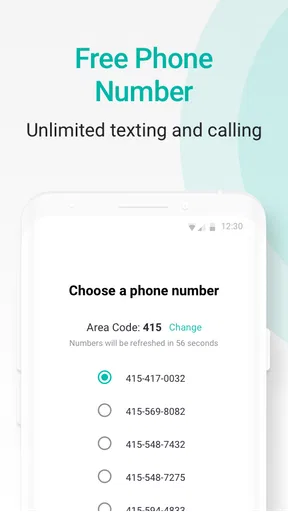
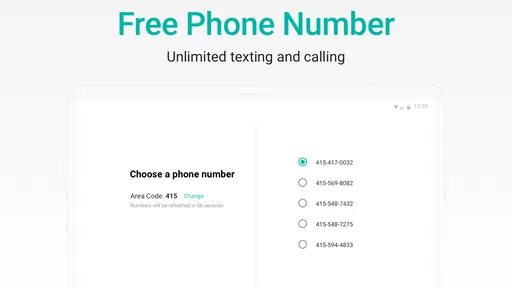
First things first, let’s talk setup. Installing 2ndLine is as easy as pie. Just hop onto the Google Play Store or Apple’s App Store, download the app, and you’re halfway there. Once you fire it up, you’ll be guided through a simple setup process where you can choose your new number. You can pick an area code that suits you, which is super handy if you’re working with clients in specific locations.
And just like that, you have a second line ready to go. No SIM cards or extra contracts required. It's all digital, folks!
Features That Make Life Simpler
Now, onto the good stuff — the features. With 2ndLine, you get all the functionalities of a traditional phone number. We’re talking text messaging, voice calls, and even picture messaging. You can send and receive texts with anyone, regardless of whether they have the app.
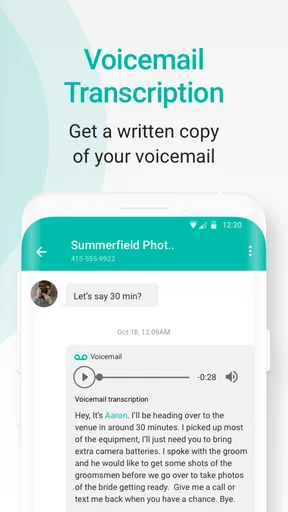
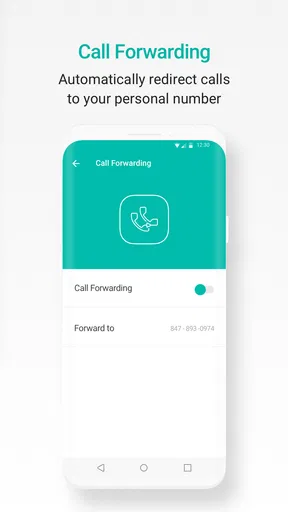
One feature I really dig is the voicemail options. You can set up a personalized voicemail for your second line, ensuring you don’t miss out on any important messages. Plus, call forwarding is available, so you can redirect calls to another number if needed. It’s all about flexibility and making sure you stay connected, no matter what.
Keeping It Professional
For freelancers and small business owners, maintaining a professional image is crucial. With 2ndLine, you can keep your business communications separate from your personal chats. It’s perfect for those who need to manage client interactions without mixing them with personal calls.
And hey, if you’re running a side hustle or two, this app can help you keep everything organized. No more missed business opportunities or confusing personal and work messages.
Using the App on the Go
Whether you’re on Wi-Fi or mobile data, 2ndLine ensures you stay connected. The app works seamlessly across different networks, so you’re never cut off. I’ve tested it while traveling, and it’s been a lifesaver for those times when I needed to make a quick call without international charges.
Plus, the app’s interface is intuitive and user-friendly. You won’t find yourself fumbling around trying to figure out how to make a call or send a text. Everything is laid out clearly, making communication a breeze.
Privacy Matters
Privacy is a big deal these days, and 2ndLine respects that. Your second number keeps your primary number hidden, which is fantastic for maintaining privacy. Whether you’re buying or selling on online marketplaces or just want to keep your personal number under wraps, this app has got you covered.
And because it’s a separate line, you have full control over who gets this number, giving you that extra layer of security.
Wrapping Up
All in all, 2ndLine is a solid choice for anyone needing that additional phone number without the fuss. It’s practical, easy to use, and comes with features that make managing multiple lines straightforward. Whether you’re using it for business or personal reasons, it delivers where it counts.
If you’re tired of carrying two phones or need to separate your work and personal communications, give 2ndLine a shot. It might just be the handy tool you didn’t know you needed.
Checking compatibility and expectations
The app is listed for devices running Android 9 or later, and its current version is 26.8.6.0. Before moving your routine calls over, I would check that your phone meets the requirement and install the current release available for it. The app has been around since February 27, 2017, and its broad reach—over 10 million installs—suggests that the second-number idea has found a sizable audience. Its average rating is 4.1 from around 139,000 ratings, with about 17,000 written reviews.
Those figures tell me it is established, not that every user will get the same call quality or experience. Connection conditions and the way you use the app still matter. I would start with low-stakes conversations, then decide whether it is dependable enough for regular customer contact. That small test is more useful than assuming an app-based line will behave exactly like the default phone service on every device and network.
A simple workflow makes the separation real
For a practical routine, I would label the number clearly wherever I save it, use its voicemail greeting to identify the purpose of the line, and choose a regular time to check it. If you are handling inquiries for a side project, that makes it easier to answer in the right context and avoid replying from your personal number by habit. A separate line is only as organized as the way you use it.
Call forwarding can be handy when you do not want to monitor the app constantly, but I would first decide whether forwarding every call suits your boundary. Sending calls to your primary line can make you easier to reach, yet it can also blur the separation you created. For work that should stay within set hours, keeping the second line’s voicemail clear and reviewing messages later may be the better fit.
Worth trying, with a clear purpose
Ultimately, I see this as a convenient tool for creating another point of contact, not a complete substitute for a separate phone service in every situation. Its combination of calls, texts, picture messages, voicemail, and forwarding gives the number practical uses beyond merely displaying a different caller ID. The best results come when you decide in advance who gets the number and how often you will check it.
I would try it if I wanted to keep marketplace conversations, client inquiries, or a small project away from my everyday number while carrying only one phone. I would choose a carrier-based line or a dedicated device if independent availability and a stronger work-life boundary mattered more. For the right user, 2ndLine is a straightforward way to make that distinction; for everyone else, its extra inbox may be more management than they need.
Verdict
Strengths of 2ndLine - Second Phone Number
- Easy setup process for new users.
- Affordable pricing for multiple numbers.
- Customizable voicemail options.
- Supports text and picture messaging.
- Works over Wi-Fi or cellular data.
Limitations of 2ndLine - Second Phone Number
- Occasional call quality issues.
- Ads can be intrusive in free version.
- Limited international number options.
- Some features require a subscription.
- Customer support response times vary.
Other Releases by TextNow, Inc.
View All
TextNow: Call + Text Unlimited
Communication4.6
Similar Picks in This Category
View All
Google Messages
Google LLC4.6

Gmail
Google LLC4.1

Google Meet
Google LLC4.4

Google Chrome
Google LLC4.1

WhatsApp Messenger
WhatsApp LLC4.6

Carrier Services
Google LLC4.2
Frequently Asked Questions
What is 2ndLine - Second Phone Number used for?
2ndLine is an app that provides users with a second phone number, allowing them to make and receive calls and texts without needing a new SIM card. It's ideal for professionals who want to separate work and personal communications, or for those who need a temporary number for specific projects.
Is 2ndLine available for international use?
Yes, 2ndLine can be used for international calling and texting. However, while the app itself is free to download, international calling rates may apply depending on the country. It's important to check the app's calling rates for specific countries before making international calls.
How does 2ndLine ensure privacy and security?
2ndLine prioritizes user privacy by providing a separate number that can be used for calls and texts without revealing your personal phone number. The app uses encryption to protect messages and calls, ensuring that your communications remain private and secure from unauthorized access.
Does 2ndLine require an internet connection to work?
Yes, 2ndLine requires an active internet connection, either Wi-Fi or mobile data, to make and receive calls and texts. This is because the app operates via VoIP (Voice over Internet Protocol), which relies on internet connectivity to function properly.
Are there any subscription fees for using 2ndLine?
While downloading 2ndLine is free, there may be subscription fees for accessing certain premium features. These may include ad removal, additional numbers, or enhanced international calling options. Users should review the app's subscription plans to understand any potential costs.
